Project intro
Designing AI observability for Sales & Marketing–agent workflows
As Google Cloud's internal Sales and Marketing teams begin working with always-on AI agents, ownership, handoffs, and how to keep account outreach in sync are becoming harder to define. I led a team of four, selected from Cornell MPS to contract with Google Cloud Business Platforms, to design AI workflow observability & CRM tooling that helps teams monitor customer outreach, surface failures, and coordinate human handoffs.
fig.1
The challenge we kept returning to: the hard problem isn't what AI can do. It's where humans stand around it.
Impact
“The team was highly responsive to feedback, demonstrated tremendous growth, and consistently experimented and iterated with strong judgment. Their work and attitude were stellar.”
Before going deeper, Katie Vivoli, Senior UX Researcher at Google Cloud and our project manager, has consistently endorsed our work throughout the contract. Below are the highlighted impacts of our contributions to the project.
discovering new ai adoption strategies
Invited to share strategic findings to 50+ Googlers
INCORPORATING concepts INTO GCBP's roadmap
3 design toolings secured senior leadership buy-in
streamlining outreach coordination & observability
Increased stakeholder satisfaction by 63%
Problem context
Google Cloud is a $43B+ business, and increasingly an AI one, which means the cracks in how teams sell and market it are about to get expensive.
Sales and Marketing sit closest to the customer—generating demand, qualifying leads, expanding accounts. They're also where AI is moving fastest: lead scoring and outreach (now with fewer hands on the wheel). And the faster AI moves inside each team, the clearer it becomes that their workflows were never properly aligned for complex enterprise deal cycles.
Design process
A problem space none of us had ever worked in
To navigate an unfamiliar problem space, we ran the project as three divergent–convergent cycles. While seemingly linear, this is a messy path, where interviews exposed blind spots in our literature review and the various design explorations reshaped the initial problem itself.

fig.2
Our triple-diamond timeline
the solution
Three enterprise toolings. Each one a different way to keep coordination from breaking
Due to the project's NDA, some components have been abstracted while preserving the original design intent
Dashboard to Align Sales & Marketing Account Outreach
A unified coordination layer between Sales and Marketing, which surfaces per-account alignment signals so both teams qualify accounts against a shared source of truth.
Observability Context Card & Audit Trail for AI-Collaborative Work
A context-preserving handoff card that keeps the story intact: who touched the work, what's still open, and what got overridden along the way.
Workflow Recovery Checklists & Alerts with Human Routing
A recovery surface for unsupervised AI workflows—warn, pause, escalate—pairing structured recovery checklists with context-aware human routing.
Research Process
We had to understand the shape of the future before designing for it
secondary Research
Mapping cross-industry future-of-work innovations
The first month was wide. We scanned the literature for what was actually being claimed about the future of work. By the end of it, I led the research synthesis—of what we have so far—to produce a map of 8 most dominant trends. Due to our NDA, however, we couldn't share the actual, final research artifacts.
~50
Sources reviewed
08 trends mapped
over 88 sub-trends
02 lightning talks
specifically invited






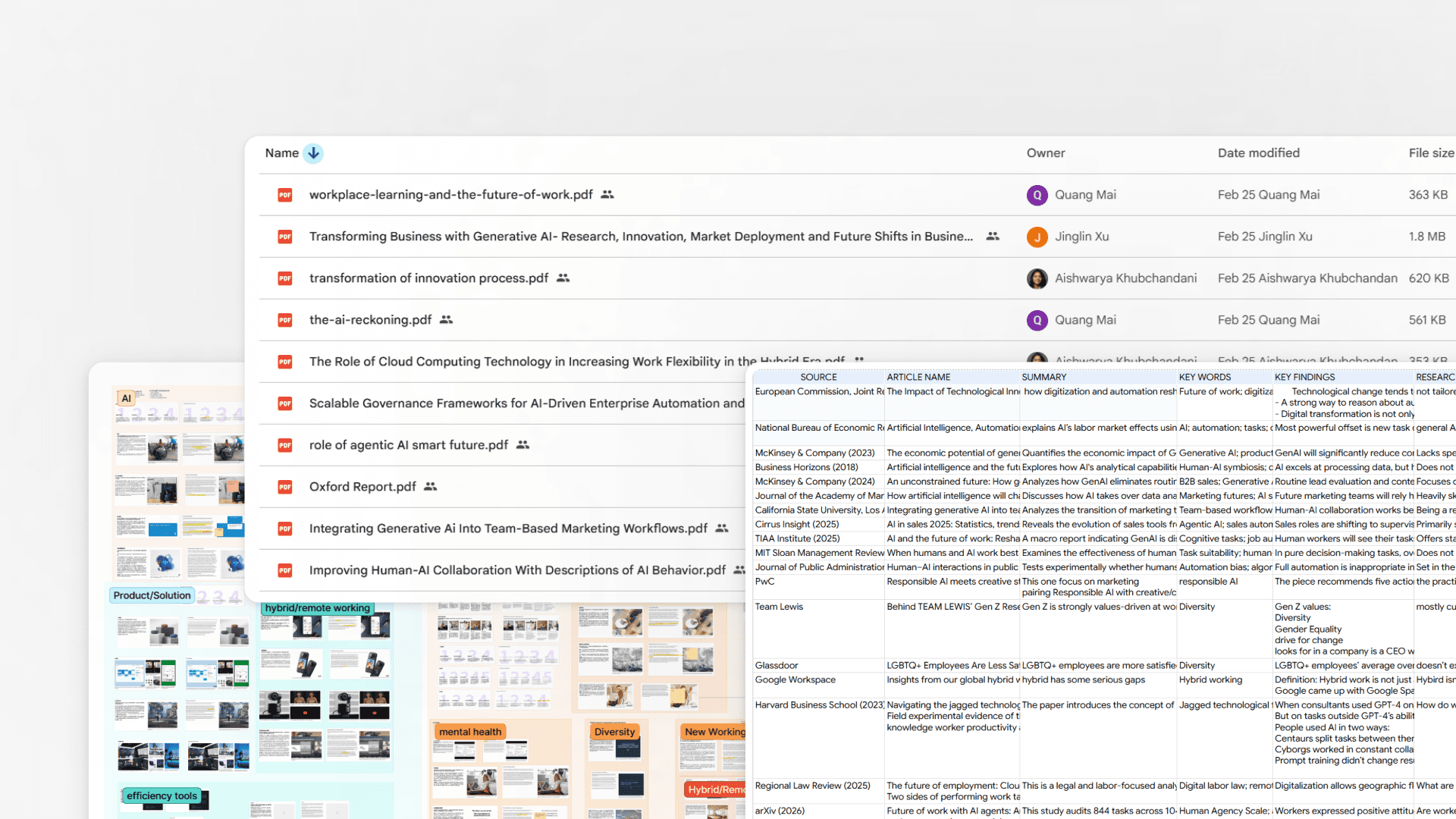


fig.3
These are elements of the secondary research artifacts that secured senior leadership's strong endorsement and buy-in
secondary research synthesis
All evidence points towards Sales & Marketing
Of the trends we mapped, Sales and Marketing was the most impacted (and the highest-leverage cut for GCBP) because it's highly customer-facing, AI is already reshaping the daily work (outreach, account scoring, campaign copy), and the coordination between the two teams is where AI breaks first.

fig.4
The most dominant trends direct our designs towards Sales & Marketing
primary research
Finding the friction nobody had complained about—yet
With a clear scope in mind, we ran interviews with Sales and Marketing stakeholders—mostly senior UXRs and UXDs in the space.
03
rounds of interviews
07
stakeholders
15+
hours of conversation
02
hmw voting rounds


fig.5
Participants annotated the maps with icons and used our industry trend diagram to identify design whitespace/risks
future problem scenarios
Three stories of how work breaks down under AI
The interviews surfaced multiple problems, but three failures kept reappearing. Each was a different way AI coordination breaks down.
Tap on these cards to learn more!
design ideation
From fifty ideas to three concepts
To generate ideas based on the key scenarios, we organized two design sprints (~2hr each). In each, we reviewed our AI product audit, pressure-tested ideas with previous Sales and Marketing stakeholders, and had them vote on directions by impact and complexity to settle our focus.
50+
ideas generated
10+
Ai products analyzed
02
Design sprints
01
concept validation

fig.6
Prioritizing top-voted ideas by stakeholders kept our designs grounded in business needs, balanced by impact and complexity
At this stage, we also draft-wireframed each shortlisted idea 3+ times in Claude Code and Gemini—quick demos from our sketches, giving stakeholders something specific enough to push back on.
design concepts
Coordination, recovery, and ownership as design interfaces
Three design directions—each addressing a distinct scenario—were developed as internal tooling flows. In charge of the design, I refined our early sketches through multiple iterations and organized one session of stakeholder validation, which led to these final designs.
Design 01
Alignment-Matching Dashboard: One shared score makes coordination instant
Sales and Marketing have always struggled to align on customer outreach, leading to wasted time, delayed deals, and buried research. Rather than replacing their separate tools, we reconciled both workflows into a single view, anchored by an outreach matching score: a shared signal that surfaces where Marketing's campaigns and Sales' account activity overlap, so both teams know who's been contacted, when, and why.
design iteration 1
Sales & Marketing combine data to signal accounts worth following
Drawing from account data from an internal CRM tooling, the alignment view aggregates Sales' ad hoc input and Marketing's campaign data into one matched-account card at a time that lives in legacy tools. But the card showed only the combined score, with no way to see how much of it came from Marketing's structured data versus Sales' ad hoc input.
I iterated on this: Marketing signals now sit in a left panel, Sales context in a right panel, with a single alignment score in the center, surfacing each side's input. I also explored a table view ranking all account scores side by side, to highlight which accounts are highest-priority before alignment scoring (since Sales and Marketing prioritize different incentives such as product domains).

fig.7
Iterations of the alignment dashboard exploring initial internal account view and external table view
design iteration 2
Making things more visible: context first, score second
While the internal account view kept the match score as the focal point, a design critique with Google Cloud designers exposed a real problem with the initial design: it's too data-heavy to scan, the customer-centric context around the account is lost.
To iterate, I pulled account data from an internal CRM tooling from Google to create a persistent banner at the top, keeping identity visible regardless of which panel is in focus. Below it, hierarchy shifted: alignment score panel moved to the outer left column, with Marketing and Sales as two balanced panels to the right, three columns instead of one dominant card with sidebars. Either panel progressively discloses (or collapses) based on viewer role: Unified (all three), Marketing (alignment plus Marketing only), or Sales (alignment plus Sales only). The result: one account view that adapts to who's reading it, without losing what the account actually is.

fig.8
Iterations of the alignment dashboard exploring the finalization of internal account view
design iteration 3
Design for user contexts
After iterating on the internal account view, I moved to the external table view following another realization: this view should skew heavily toward executive level viewers, not sales or marketing reps working accounts row by row, and executives needed a contextual read, not a scan. To iterate, I thus wrapped the table in a KPI snapshot banner, surfacing conversions, renewal rate, and rejection rate before any row is read, plus inline status color dots for lead state. Splitting the fix this way let each surface serve its actual audience: a glance for executives, a drill down for reps.

fig.9
Iterations of the alignment dashboard exploring the finalization of external table view
Insights of how Sales and Marketing messily qualify leads pointed us to three design principles:
Score decides coordination
Both teams act from the same alignment %. Less syncing and busywork required.
Incentive-first signals
Sales and Marketing are driven by different incentives. Each's motivations should be visible to the other.
Legacy-first design
Every customer has a next step and a named owner and design must be ‘legacy-aligned.’


03
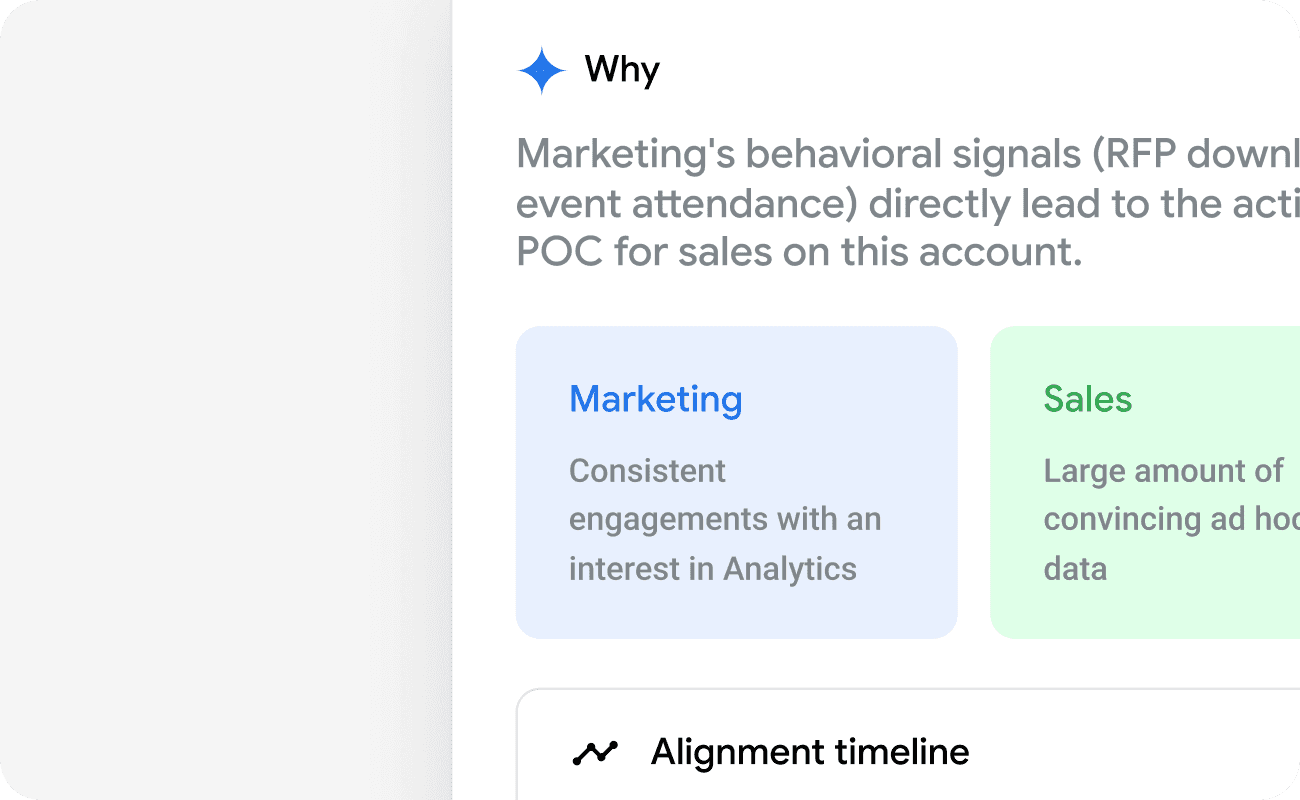
Then the product flags. The account maps to a product area, or an incentive that matches a seller's goal.
04
Clicking into an account opens the unified view, or the "why." What Marketing saw, what Sales saw, and what to do next.
Design 02
Transparent Human-AI Context Card Handoff: The hidden context is no longer hidden
When work passes between agents and humans, context gets lost. Not just details, but the reasoning behind every decision made along the way. We designed a context card that travels with the work itself, logging every AI action, human override, and unresolved flag. The next owner inherits the full history and a clear view of what still needs attention.
design iteration 1
Audit trail to tie everything together
Expanding on our AI product audit, a clear feature stood out: an audit trail to preserve context between human-agent workflows. We began iterating around this feature, first focusing on one console that packed in all context timeline, version history, edits, and the different stages work had passed through between agents.
But after consolidating our designs in a review session, we got a critique that forced us to overhaul our design: the console was cognitively overloading. So instead of specific, full version-history edits, we made the console show high-level changes with step-like edits, and added a separate page for the specific drill-down into the audit trail and the work's context.

fig.10
Iterations of the hand-off context card exploring context timeline and audit trail
design iteration 2
Bogged down in details
For the external context card leading into the audit trail drill-down, a Google Cloud designer raised a key question: does showing human-AI contribution detail still matter to business outcomes?
That pushed a pivot. I moved the document diff and specific AI contributions into the drill-down, reserving that detail for users who need it. In its place, I added a high-level summary showing what AI did, what the human did, and the next steps via a dropdown checklist. This gives users a clear view of the handoff—what changed and what to do—without the line-by-line edit detail getting in the way.

fig.10
Iterations of the external Human-AI context card
design iteration 3
Comparative view of documents
For the more specific drill-down of the audit trail, the initial version was bare-bones: clicking each stage simply showed what had changed. But this didn't address the earlier feedback from the external context card layer, how does showing human-AI contribution detail still matter to business outcomes?
Our research showed that the Sales and Marketing handoff process is itself convoluted, with task delivery fragmented across different software and individual workflows. That reframed the problem: the drill-down needed to address this fragmentation, not just expose more detail. So I moved the human-AI contribution panel inward and paired it with two capabilities: replaying editing activity, and uploading source documents (with inline status colors) to verify truth at each stage. Stages with more AI involvement are flagged as needing more verification.

fig.11
Iterations of the internal audit trail
The handoff problems between Sales and Marketing — once AI is in the loop — gave us three design principles:
Clear context timeline
Quick overview showing every owner change, every AI completion, every human override.
Pending actions surface
The next owner sees what's open, and what needs attention (not just what was done).
What changed, what didn't
Edits are logged. More work visibility to the next owner. No private assumptions.


03
Tasks are then made urgency-tagged, with 'Pending', 'On Track', or 'Needs Attention', & a clearly named owner.

04
Finally, the audit trail shows re-playable timestamped log of every action showing who did what.
Design 03
Human-Escalated AI Recovery Checklist: When the agent fails, the recovery plan already runs
When an AI agent fails mid-outreach, the default is an error message and a human cleanup (and that doesn't scale). We designed a three-step recovery flow: the agent flags its own failure, proposes actions, and escalates to a human only if unresolved. The design points towards a clear next step.
design iteration 1
Checklist coupled with explainers for a clear next step
For Sales and Marketing teams using AI to clean up outreach, AI failures are often investigated manually and in silos. In a large enterprise like Google Cloud, with layered team hierarchies and multiple AI agents now handling work, ignoring this compounds into reputational damage for middle managers and erodes trust and accountability. My first iteration was a simple narrative card detailing the mistake's source, with a green section highlighting the next step.
This proved too text-heavy for a first-time user who needs a quick read before acting. I broke the narrative into three severity levels from interview insights (e.g., Paused, Warning, Escalate), each split into what happened, what to fix, and who to escalate to. Further, the problem when escalated to the 'Paused' stage is also broken down into a step-by-step checklist of what to do. This enables faster fixes for AI failures.

fig.12
Initial iterations of the AI recovery checklist
design iteration 2
A more grounded checklist
A checklist that forces users to escalate step by step before reaching a human was a strong idea, praised in design critique for its clear next steps and progressive disclosure. But that step-by-step nature wasn't clear in the design, and the text-heavy checklist overwhelmed first-time users—partly because it wasn't clear what counted as a failure, or how worth fixing each step was.
To fix this, I added a progress indicator to make the step-by-step flow clearer and less overwhelming. I also added small pills under each step showing time needed and importance, so users can feel the urgency. To explain how failures are determined, I added a small FAQ section, without revealing the internal, NDA-protected AI agents behind it. Together, these changes turn the checklist from a wall of text into a clear, guided path to resolution.

fig.13
Further iterations of the AI recovery checklist
When AI fails in Sales and Marketing, reputation is on the line. As such, three design principles came out of that:
Severity progression
Warning → Pause → Escalate. Each step gives the human a chance to resolve before the next one fires.
Structured, required checklists
The agent doesn't just say "I failed." It proposes specific recovery actions, in priority order.
Scannable in two seconds
Chips show why the AI tripped up. No paragraphs to read before acting.
product flow

01
Failure is presented through three alerts: Paused, Warning, Escalation, which ranks the its immediacy.

02
Next, structured checklist provides concrete actions in order, before anything goes to the next person.
03
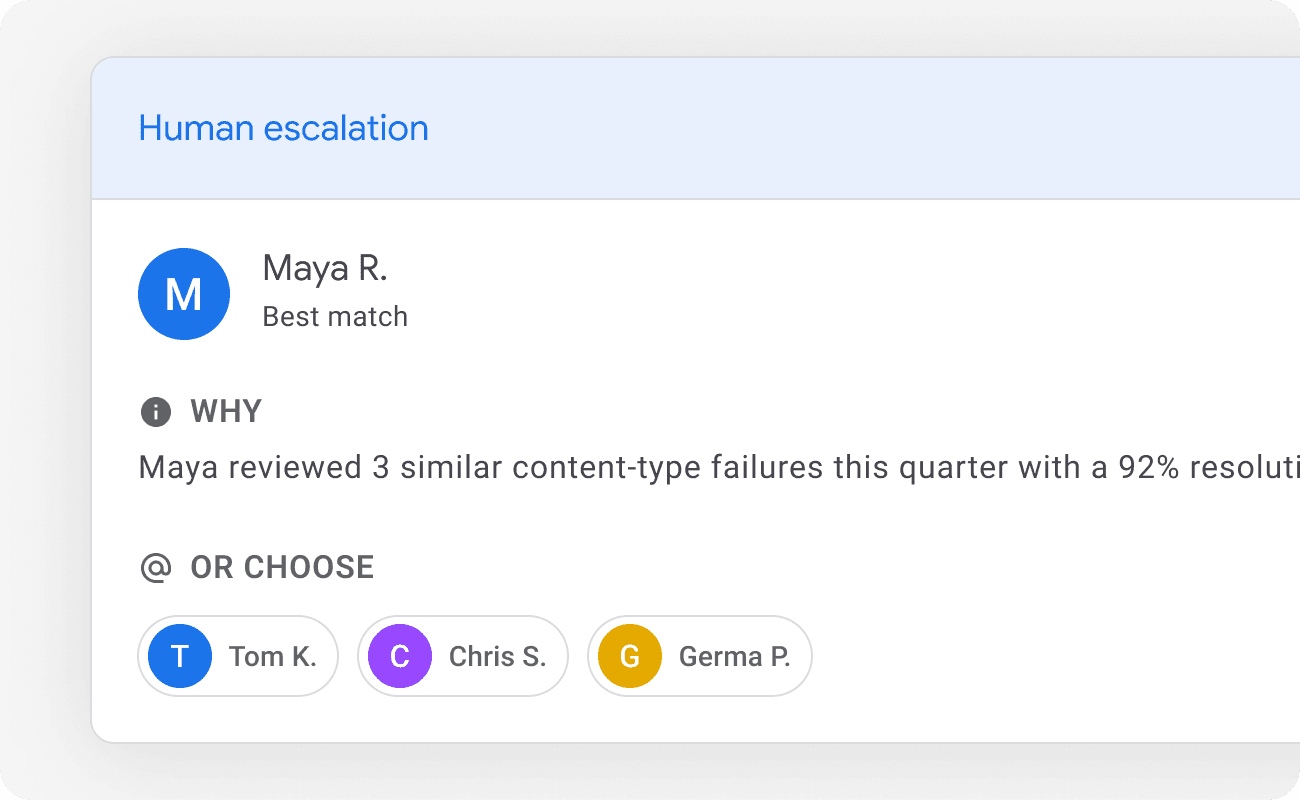
If that is still insoluble, the next step is human escalation (routed by AI based on similar cases before).
project reflection
Designing for enterprise AI is different in ways that aren't always named
systems thinking
The four arguments that tie everything together.
Across the project, the same four arguments kept showing up, whether it's in interviews, in critiques, or in our own design arguments. They're what holds the three concepts together. These are not a list of features, but one system with a point of view.
01
Coordination is the unit of design.
Most UX assumes one user completing one task. Enterprise AI design has to assume multiple users, multiple agents, partial information, and asynchronous actions. The "user" is often a team, not a person.
02
Fallback and recovery are first-class surfaces.
When agents run unsupervised, the failure UI matters more than the success UI. If you only design what happens when AI works, you've designed for the 10% of cases that don't need design help.
03
Provenance is part of the product.
Every AI completion needs a visible trail (what it produced, what a human changed). Without that, work becomes uncheckable, and uncheckable work doesn't ship in regulated industries.
04
You're designing for an adoption curve.
The same concept lands differently in a team with high AI maturity versus low. Good enterprise AI design is robust to where the team currently is, and not just where it could be.
Personal reflection
Four months are enough to do real work but not enough to do it perfectly. Looking back:
the decisions i'd defend
One of the harder calls we made was cutting the scope to just Sales and Marketing. It cost us a week of justifying the decision in critiques. Without that cut, we'd have spent three months producing 'well-researched generalities'.
CONSTRAINTS & the decision i'd revisit
Our scope was open by design. NDAs kept some of the technical details on Google's side from being shared with us, but our manager briefed us of a future data layer that could carry what we were designing. The piece we planned but didn't get to (which I'd love to revisit): survey Google designers across departments to further pressure-test the designs.
The concept I'd further flesh out
The alignment dashboard is the one I'd flesh out more next. In validation, designers kept coming back to it; its impact thus felt palpable. It's the concept that does the most work: one account view that reconciles Sales and Marketing, settles attribution, and syncs outreach between two teams.